Practical guide
Checking Passport Name and Document Details on 12306
Read the current passport labels and official entry guide, compare required fields, and check the selected saved passenger and actual order. Keep unusual-name and correction questions unresolved until the appropriate official instructions are clear.
The quick answer: read the passport labels, then the current 12306 instructions
The public 12306 English registration guide labels the name as “Surname+Given Names”: surname first, followed by given names. Read the separately labelled fields in your current passport rather than reversing the name from memory or using your everyday introduction order. The plus sign is the diagram's heading; it is not an instruction to type a literal plus sign.
The official English registration page has a single “Name” field and a link called “Check the rules for filling out passport information.” Its first passport example maps surname and given names to that name heading, alongside the other document fields. Checked 31 October 2026. This describes the public English website and the reviewed example, not every possible version of the app or every passport format.

For spaces, hyphens, accents, long names, a single name or any unclear prompt, follow the current applicable instructions or ask 12306. The reviewed diagram does not establish a universal character limit or a rule for rewriting those names. Successful typing, a saved passenger or a payment attempt should not be treated as proof that all identity checks are complete.
Read surname and given names as document fields
Place the current original passport beside the booking record. Find its surname or family-name field and its given-name field. Include the document's name components in your comparison; do not substitute a nickname, an initial or the first name you normally use. A person who uses a middle name socially may have several names together in the passport's given-name field.
For an invented label-reading example, suppose a passport shows Surname: RIVERA and Given names: ALEX MORGAN. Under the official diagram's surname-then-given-names structure, the surname component is RIVERA and the given-name components are ALEX MORGAN. This example identifies the components and their order. It does not demonstrate a tested 12306 input string, required spacing or a valid passport record.
The official illustrated passport itself shows separate surname and given-name labels. Do not copy its sample name, number or dates into your own record. Its layout is a field-finding example, not a template to change a person's identity.
Use the current form's guidance for how those components must be entered. If the fields in your document do not fit the guide clearly, keep the question unresolved and seek official assistance. Do not invent a surname, discard a name or copy the filler symbols in the passport's machine-readable lines into a name field simply to make a form accept it.
Compare the required fields before selecting the passenger
The public English registration form shows nationality, name, passport number, passport expiration date, date of birth and gender, alongside separate account fields. Its notice says that only foreign passports are accepted for registration at present. The English FAQ's accepted-document answer likewise describes valid foreign passports usable under the applicable requirements. That is the English website's scope; it does not describe every document accepted through every railway channel.
| Field | Compare with the current passport | Common mix-up to prevent |
|---|---|---|
| Passenger name | Surname and given-name labels, under the applicable entry instructions. | Using a nickname, account username, shortened name or unconfirmed name order. |
| Document type | The document category that actually matches the passenger and channel. | Selecting a convenient category that does not describe the document. |
| Passport number | The current passport number, checked character by character. | Copying an old saved number or confusing similar-looking letters and digits. |
| Nationality | The nationality field and the corresponding choice offered by the form. | Using a country of residence or birthplace as a substitute. |
| Date of birth | The passport's birth date, using the form's displayed date format. | Reversing day and month or copying a document issue date. |
| Passport expiration date | The current passport's date of expiry. | Using its issue date or the expiry of a previous passport. |
| Other required fields | The applicable document information and current field instructions. | Assuming a generic checklist overrides a document or operator requirement. |
Read account fields separately. “Username” is an account identifier, while “Name” is passenger identity information. A rule shown beside an account field is not automatically a rule for the passport-name field. Likewise, the account holder and the passenger in a companion booking may be different people.
For a group, repeat the check for each selected passenger. A correctly entered account-holder passport does not verify a companion's record. Compare the actual selection, rather than assuming a similarly named saved passenger is the one you intended to book.
If a name or system prompt is unclear, ask the specific question
Pause before editing identity information by trial and error. A form may accept text without showing whether that text satisfies the later identity process. Keep the exact non-sensitive error wording and field label so you can ask a focused question.
| Situation | What to preserve in your question | What not to assume |
|---|---|---|
| More than one given name | Which names the passport places under the given-name label. | That only the everyday first name is needed. |
| Hyphen, apostrophe or accented letters | The relevant name structure and the current form's wording. | That removing marks or substituting letters is always allowed. |
| Long name or apparent length issue | The exact field label and displayed instruction or error. | A universal name limit based on another website or an account-field limit. |
| Single name or an empty surname/given-name field | How the issuing passport actually labels the name. | That you should invent a second name or use a generic placeholder. |
| Different name order or display after saving | The entered components and the actual saved passenger display. | That a visually different order is automatically accepted or rejected. |
Ask, “For this passport's name structure, what should I enter in this field on this channel?” If a ticket already exists, also ask about the appropriate correction procedure for that booking. A general name-format answer does not by itself resolve an existing order.
You can first describe the structure without publishing a full passport image. If the official service needs document information, provide it through the appropriate private channel and follow its instructions. Do not send a passport scan, password or payment details to a public forum while asking how a field works.
Check the saved passenger and the actual order separately
The 12306 English FAQ tells users buying for others to add them to “My Passengers” and enter their name, valid document type and number accurately. It also refers to identity-information statuses and corresponding website prompts. Read the actual status and instruction shown for your passenger; this article does not promise a verification time or interpret every app status as identical.
| Stage | Useful next action | Outcome to leave unconfirmed |
|---|---|---|
| Saved passenger, before an order | Compare with the current passport; follow the available official correction instructions. | That the change has completed verification or applies to every older order. |
| Unpaid order | Check the selected passenger and the identity information in this order before paying. | That payment will repair a typo or choose a different saved passenger. |
| Paid or confirmed order | Contact the channel that issued the booking and ask about the discrepancy and required procedure. | That changing a profile rewrites the order, or that correction or refund is free. |
| At station entry or boarding | Keep the booking document and reference accessible; ask railway staff for the applicable help. | That a screenshot, similar name or verbal explanation guarantees admission. |
For a renewed passport, compare its current number and dates with the saved record before a new purchase. If an existing order uses the old document, explain that specific situation to the booking channel or railway staff. Do not assume you can silently change an order's document or use whichever passport is easiest to carry.
Describe the problem precisely: selected wrong passenger, mistyped number, renewed passport, unclear name entry or unresolved verification prompt. These are different questions. Keep the original reference and any official response so you can follow the instructed next step. Ticket availability, correction, rebooking, change and refund outcomes remain subject to the applicable process.
Keep the required document accessible and the help note private
For e-tickets, the English FAQ says to retain the ticket information and the valid identity document used to buy the ticket, and show that document for station entry, exit and boarding. It also says an itinerary sheet and reimbursement receipt are not tickets. A screenshot can help you recall a reference; it does not replace the required original identity document.
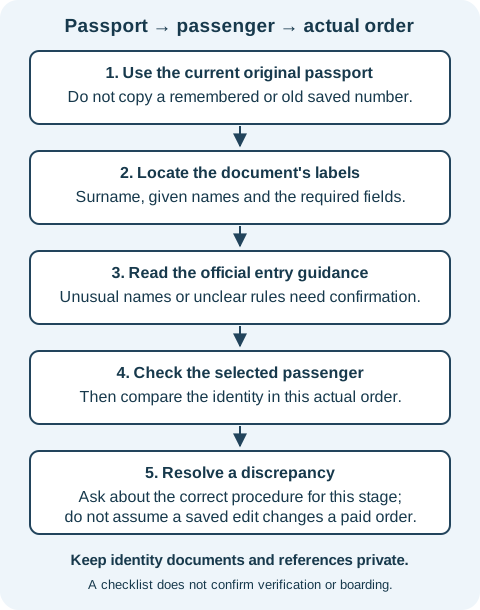
Keep the passport accessible rather than buried in luggage. Save the train number, date, exact stations and booking reference privately. For interpreting the journey fields, use the Chinese train-ticket field guide. Identity details and journey details both matter, but are different parts of the check.
A shared group itinerary usually needs meeting time, train and station details; it does not need everyone's complete document numbers or scans. Keep the private identity check separately and share only what the relevant person or official service needs. This article's blank records intentionally let you use a passenger reference instead of writing a full passport number in every working copy.
Four fictional examples show the check to make
These examples are invented to illustrate questions, not tested bookings or railway decisions.
1. Everyday name order replaces the passport labels
A traveler introduces themself using a given name first and copies that order without reading the labelled surname field.
Check: locate surname and given names in the current passport, then use the applicable official name-entry instructions.
The official diagram provides surname-then-given-names structure. It does not settle every punctuation or spacing question.
2. A saved record belongs to the previous passport
A traveler has renewed their passport and recognizes their name in “My Passengers,” so assumes all the details are current.
Check: compare the current number, expiry and required fields with the actual saved passenger before a new purchase.
If an order already exists under the older document, ask about that order's procedure rather than assuming a saved-profile edit fixes it.
3. A companion shares a similar name
A group organizer selects a familiar saved name without comparing the document details of the companion travelling this time.
Check: match the selected passenger to that companion's current passport, then review the identity information in the actual order.
The organizer's account identity cannot substitute for the selected passenger's identity.
4. A hyphen is removed to clear an error
A traveler sees a name-field error and wants to remove punctuation because an online comment says that always works.
Check: retain the non-sensitive field prompt and ask 12306 how to enter that name structure on the current channel.
Acceptance of a text field alone is not evidence that the changed identity will satisfy later checks. Do not promise a fix from another person's experience.
Copy two private records and check six interpretations
Use the first record before payment and the second when you need official help. Put the exact field and stage into the question. Keep full document details private and do not use this worksheet as a boarding credential.
12306 — PRIVATE PASSPORT FIELD CHECK
Passenger reference used in this working note:
Current original passport checked on:
Surname and given-name labels located:
Name entry compared with the current official instructions:
Document type and number compared privately:
Nationality, birth date and expiry checked:
Other required document fields checked:
Saved passenger selected for this actual booking:
Order identity details checked before payment:
Unresolved field or prompt requiring official help:
Keep full document numbers and passport images out of shared copies.
12306 — QUESTION FOR OFFICIAL HELP
Channel or page I am using: English website / app / other:
Stage: saved passenger / unpaid order / paid order / station:
Exact field label and non-sensitive error wording:
The discrepancy or unusual name structure:
Whether the passport was renewed since the saved record:
Question about the permitted entry or correction procedure:
Official response, date and next action:
Booking details to provide privately through the appropriate channel:
Do not include passwords, payment details or full passport scans in this note.
Download the two blank records, three field-check tables and six explained cases. Check the current official instructions again when using the records.
Case 1
The official diagram heading says “Surname+Given Names.” Must you type a literal plus sign between the components?
Show answer and explanation for case 1
No. The heading shows the component order, not a demonstrated typed separator.
Use the current applicable entry instructions. The reviewed picture maps surname and given names, but does not establish all spacing or punctuation rules.
Case 2
A username rule appears near the account fields. Does it establish the maximum length of the passport-name field?
Show answer and explanation for case 2
No. Check the rule for the actual field you are completing.
Account username and passenger name are separate fields. A limit or accepted character rule for one must not be transferred to the other without official instructions.
Case 3
A passport has been renewed, but the saved passenger still has the old number. Is recognizing the name enough before a new purchase?
Show answer and explanation for case 3
No. Compare the current document number, dates and required fields.
The name can remain familiar while document details change. If an order already exists, ask the appropriate channel about that order rather than assuming a profile edit changes it.
Case 4
The account holder is correctly registered. Does that establish the identity details for every companion selected in an order?
Show answer and explanation for case 4
No. Check each selected passenger against their own current passport.
The account holder and traveller can be different people. Correct account information does not verify a companion record or confirm that the intended saved passenger was selected.
Case 5
A paid order contains a discrepancy. Can you assume editing My Passengers corrects the paid order without further action?
Show answer and explanation for case 5
No. Ask the issuing channel about the procedure for that specific order.
A saved passenger record and an existing order are different checks. This guide does not guarantee a correction, free rebooking, refund or boarding outcome.
Case 6
You have an itinerary screenshot but not the required original identity document. Does the screenshot replace that document?
Show answer and explanation for case 6
No. Follow the railway requirements for the original booking document.
The English FAQ requires the valid identity document used for the e-ticket and says itinerary sheets and reimbursement receipts are not tickets. A reminder image does not establish identity or boarding eligibility.
Sources and further reading
- China Railway 12306: English registration page and linked passport-information guidePublic identity and account field labels; the first linked official passport example shows surname then given names. Checked 31 October 2026.
- China Railway 12306: English frequently asked questionsAccurate passenger name, document type and number; English-site foreign-passport scope and required e-ticket identity document.